
Custom properties allow you to add additional fields / dimension to documents or transactions in Light (e.g. cost centers, departments, projects).
Step 1 – Define Your Custom Property
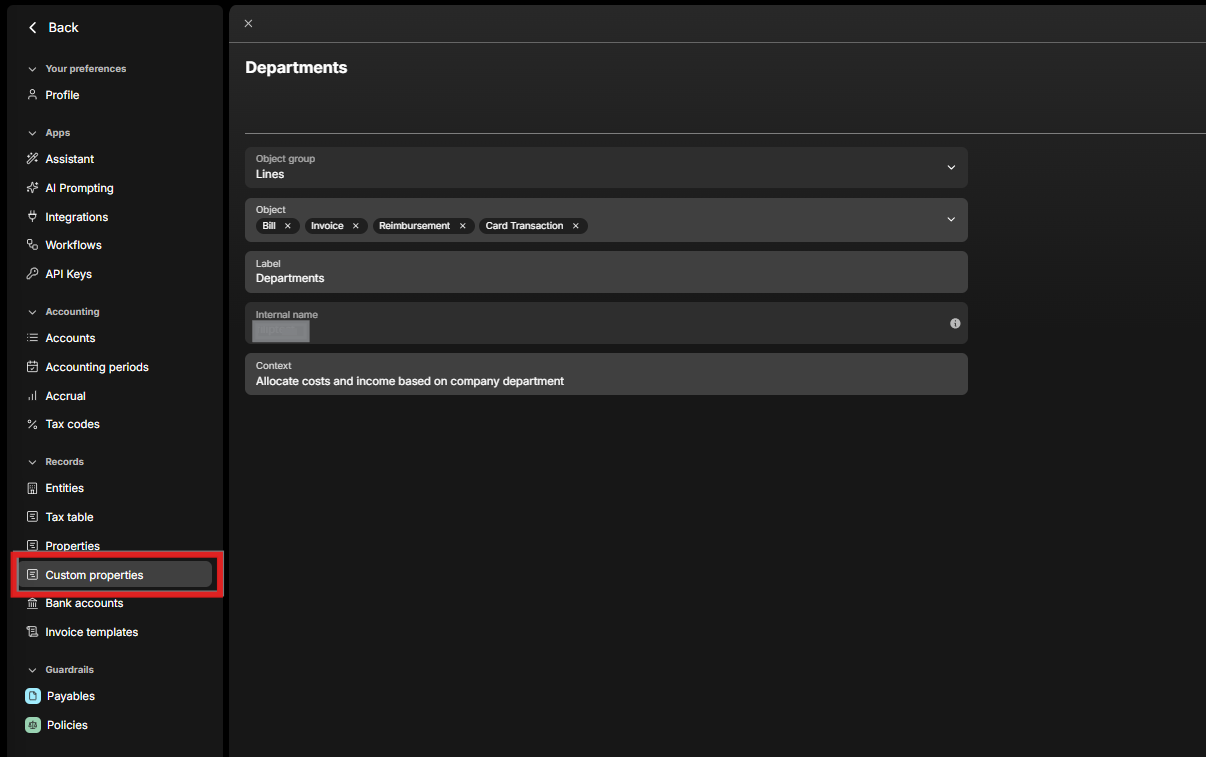
Navigate to Settings → Custom Properties.
When creating a new property, define the following:
-
Location
-
Header – applies to the whole document (e.g. entire bill or invoice)
-
Line – applies to individual line items within a document i.e. you can apply a different custom property to individual line items of one invoice
-
-
Name
-
Display name of the custom property
-
-
Internal Name
-
Technical identifier for backend mapping, no need for action
-
-
Object
-
The document or data point to which the property applies
-
Available objects include:
-
Sales invoice
-
Bill
-
Reimbursement
-
Customer
-
Vendor
-
… and others
-
-
Step 2 – Configure Property Values
-
Required vs Non-Required
-
Required – field must be completed before posting a transaction (e.g. department, cost center)
-
Non-Required – optional field, useful for selective tagging (e.g. projects, events)
-
-
Values
-
Enter the options you want to appear in the dropdown menu.
-
Example: Cost Center = Sales, Marketing, IT, Other
-
-
Context (optional)
-
Add a description that helps Light’s AI intuitively pre-allocate the property.
-
Example: “Marketing cost center includes advertising, LinkedIn campaigns, SEO, events, merch, etc.”
-

💡Example Use Cases
-
Cost Centers – allocate expenses to Sales, Marketing, IT, etc.
-
Projects / Events – tag all related costs with a shared code for total spend tracking
-
Departments – enforce consistent allocation across invoices and reimbursements