
Overview
The Releases module in Light automates time-based recognition of costs and revenues — including accruals, prepayments, deferred revenue, and depreciation.
It ensures that expenses or income are recognised over time rather than all in a single posting period.
This helps maintain an accurate P&L vs. Balance Sheet split — and replaces manual spreadsheets or recurring journal setups.
What the Releases Engine Does
Every release in Light has two sides:
- Deferred / Balance Sheet side — where the cost or income is initially recognised (e.g. Prepaid Expense, Deferred Revenue, or Fixed Asset)
- Recognised / P&L side — where periodic releases move the value into expense or income
Light automates this over time, posting the release journals automatically at each period boundary.
Where Releases Live
Go to:
Accounting → Releases
This view shows all active release schedules across your entities — including:
- Accruals & prepayments (from Bills or Journals)
- Deferred revenue (from Sales Invoices)
- Depreciation schedules (from Fixed Assets)
Each line shows:
-
Start date
-
Progress bar
-
Book value remaining
-
Release type (Accounts Payable, Receivable, Fixed Asset, Journal Entry)
You can filter by:
-
Type (e.g. Fixed Asset, Accounts Payable, Accounts Receivable)
-
Entity / Account / Progress / Type
-
Date range
This makes it easy to reconcile against your Balance Sheet or to use as a Fixed Asset Register.
Release Templates
Templates define how releases are created and posted.
They act as blueprints for accruals, prepayments, deferrals, and depreciation.
Go to:
Settings → Releases Templates
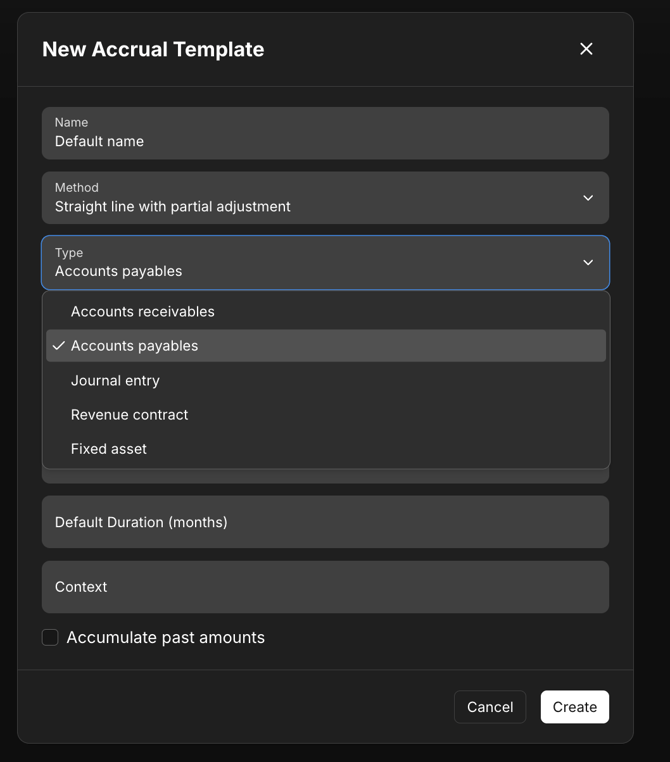
Each template specifies:
-
Name (e.g. “Prepayments”, “Deferred Revenue”, “Laptop Depreciation”)
-
Method: currently Straight line with partial adjustment
-
Type: which area it applies to (Accounts Payable, Receivable, Fixed Asset, Journal Entry)
-
Contra account: where the offset is booked (e.g. Deferred Revenue, Accrued Expense, Accumulated Depreciation)
-
Default duration: e.g. 12 months
-
Residual / Initial %: for partial front-loading if needed
Templates ensure consistent treatment across all entities — and remove manual setup each time you accrue or defer.
Creating a Release
You can creating a release works in the same way across all document types
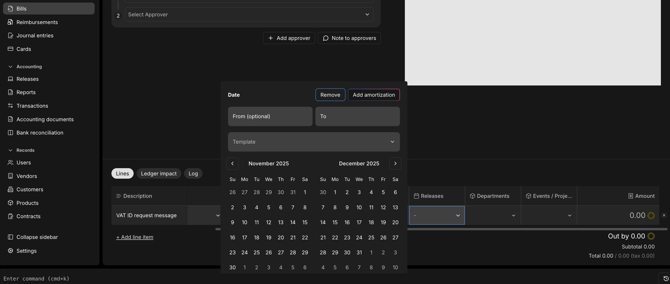
In the Releases column of the line item, select the release template to govern its reversal or spread.
.png?width=670&height=231&name=releases%201%20(1).png)
How the Schedule Works
Each release schedule includes:
- Start Date
- Frequency (monthly, quarterly, annually)
- Duration (number of periods)
- Release Amount per Period
By default, Light spreads the total evenly, but amounts can be manually adjusted per period.
All release postings are normal journals — visible in Transactions and Reports.
Posting & Journals
At each period boundary, Light automatically posts the release journal:
Example:
Debit: Expense (P&L)
Credit: Prepaid Expense (Balance Sheet)
Each release line links back to its parent Bill, Journal, or Fixed Asset — providing a complete audit trail.
All postings appear in:
- Transactions report
- Ledger
- Balance Sheet / P&L reports
Editing or Cancelling Releases
To edit a release, you should edit the dates on the originating invoice, bill or manual journal
Note: Be careful, editing will reverse the underlying transactions, so your historic reports may change. This won’t be possible if the periods are closed.
Reporting & Reconciliation
The Releases list itself is a live roll-forward view:
- For prepayments → acts like a Prepaid Expense register
- For fixed assets → functions as a Fixed Asset register with accumulated depreciation
- For deferred revenue → supports revenue recognition schedules
Finance teams typically reconcile the Book Value column to the related Balance Sheet account each month.
You can also use Reports → Tables to:
- Reconcile Prepayments vs P&L expense
- Analyse Depreciation by Asset Class or Department
- Monitor Deferred Revenue movements
Current Limitations
- Only straight-line release method is supported today (partial adjustments allowed).
- FX revaluation of deferred balances is handled via normal ledger FX logic.