
Your Chart of Accounts (CoA) is a core part of your Light setup and must be correctly structured before upload to ensure accurate postings and reporting.
Before getting started, we recommend reviewing the formatting requirements below and downloading the example CoA template to use as a reference. Following these guidelines helps avoid delays and ensures a smooth import.
🔗 Example CoA template
📁 File Preparation Requirements
Required Columns
|
Column |
Description |
Notes |
|
Account code |
Must be 6 digits |
Required for all accounts |
|
Account name |
Account label / naming convention |
No strict rules / requirements |
|
Account type |
High-level type (e.g. CURRENT ASSETS, ACCOUNTS PAYABLE) |
|
|
Entity |
Entity/Entities allowed to post on the account |
“ALL” or entity code(s) (e.g. “UK”, “001”, “UK,GE”) |
|
Status |
|
Disabled accounts remain in system but cannot be posted to |
Optional Columns
|
Context |
Short, plain-language description of the account’s purpose (enhances AI understanding) |
|
Intercompany
-
Only one code needs to be configured for this purpose, regardless of the number of entities within the group.
⚙ System Accounts in Light
-
Light requires 7–9 system accounts for correct operation.
-
Account names are flexible, but the Account Type must match one of the valid types below.
|
System Account |
Required Account Type |
Description |
|
ROUNDING |
OTHER_OPERATING_EXPENSE |
Rounding errors from currency translations |
|
FX_LOSS |
EXCHANGE_RATE_LOSS_REALIZED / GAIN_REALIZED |
Posting realized loss (during clearing) |
|
FX_GAIN |
EXCHANGE_RATE_LOSS_REALIZED / GAIN_REALIZED |
Posting realized gain (during clearing) |
|
FX_UNREALIZED |
EXCHANGE_RATE_LOSS_UNREALIZED / GAIN_UNREALIZED |
Unrealized FX adjustments during revaluation |
|
SALES_DISCOUNT |
DISCOUNT |
Discounts on sales invoices |
|
BANK_FEES |
GENERAL_AND_ADMINISTRATIVE_EXPENSE |
Bank charges on payments |
|
BANK_CLEARING |
OTHER_EQUITY |
Intermediary account when posting in a different currency than ledger account, always net 0 |
|
CURRENCY_TRANSLATION_ADJUSTMENT |
ACCUMULATED_OTHER_COMPREHENSIVE_INCOME |
FX revaluation between local and group currencies |
|
ELIMINATION |
OTHER_CURRENT_LIABILITY |
Counter-account for eliminations |
Before Upload
-
⚠ The file must be in CSV format before upload to Light
-
⚠ There must be no empty lines in the file
⬆ Upload Process (in case you already have access to Light)
-
Navigate to Settings → Accounts → Upload
.png?width=670&height=468&name=image%20(1).png)
- Upload your .csv CoA file
- Ensure no empty rows
- Column names must match system field names
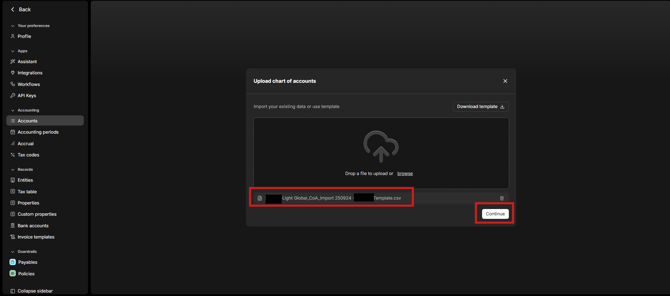
- The system will analyze your file (⏲ approx. 15–20 min) — you can continue working in another tab
- Then you will be prompted to confirm your columns matching as proposed by AI.
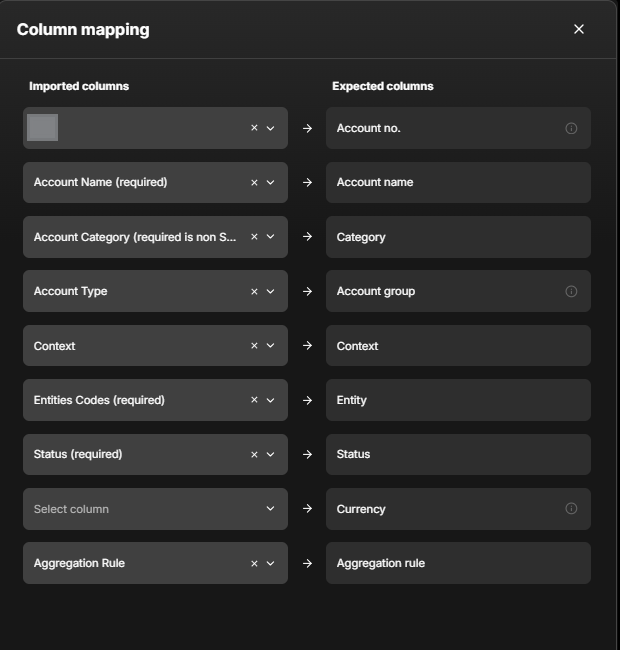
- Resolve validation errors (see below)
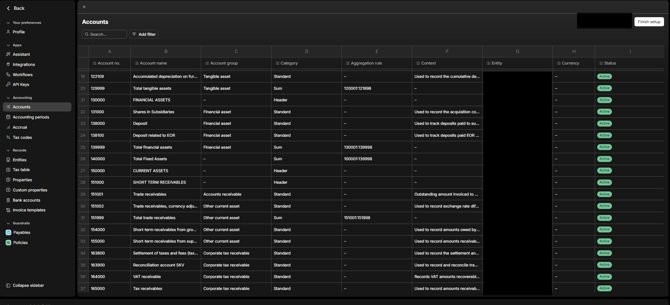
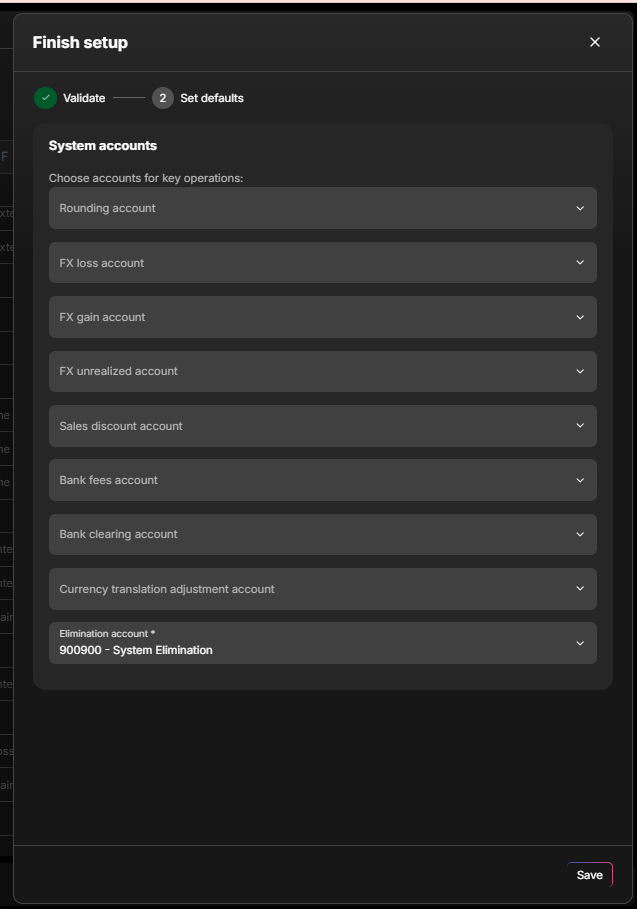
- Confirm your System Accounts by selecting from the dropdown
- Click Save — your CoA is now live ✅As last step system will prompt you to confirm your system accounts - search the drop down list to select the right accounts
- Press save and your chart of accounts is live.
❌ Common Upload Errors
|
Error |
How to fix |
|
Missing Account Code |
Ensure each account has a unique 6-digit code |
|
Invalid Aggregation Rule |
Use correct 6-digit code format (e.g. |
|
Wrong Type for System Account |
Verify account type matches required system type |
|
Header Account Has Type |
Leave Account type blank for header accounts |
If issues persist, contact Light Support for help or to complete the upload for you.
🧭 Managing the CoA Over Time
-
Accounts can be edited individually but not bulk-updated.
-
Accounts cannot be deleted, only disabled which means they stay in the system but it will be impossible to post to them
-
Revalue open balance for foreign currency (only for BS accounts):
-
if ticked then at the month-end close the balance on the account will be revaluated from transaction currency to local currency of the entity and the FX difference will be posted to Unrealized FX gain/loss
-
Automatically enabled for: ACCOUNTS_PAYABLE, ACCOUNTS_RECEIVABLE, BANK, CARD, CASH & EQUIVALENTS
-
Can be toggled on/off for other balance-sheet accounts (except AP/AR)
-
-
Currency Translation:
-
For conversions between local and group currency (usually for reporting purposes) the conversion is done at either historical or month-end spot rate (each pre-defined by system based on account group), the FX diffence between those is automatically posted on system account Currency translation adjustments
-
Historical rate: EQUITY, EXPENSE, REVENUE
-
End-of-month rate: ASSET, LIABILITY
-
-
FX differences automatically post to Currency Translation Adjustment
-