
Overview
Manual Journals allow finance teams to post ledger entries directly — without a Bill, Invoice, Card transaction, Reimbursement, or Bank event.
Typical uses include reclassifications, corrections and payroll.
Manual Journals are part of the general ledger — once posted, they behave exactly like any other ledger transaction in reporting.
Creating a Manual Journal
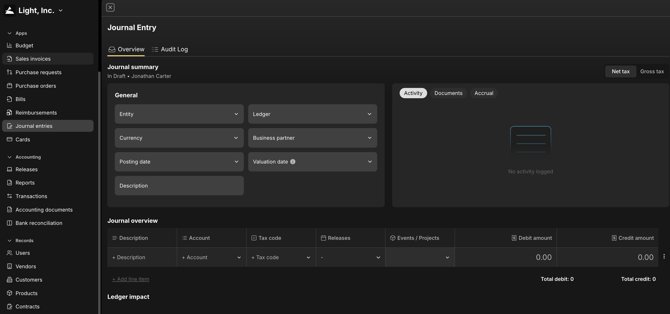
Journals → Manual Journals → New
Enter:
- Entity
- Debit account
- Credit account
- Amount
- VAT code (if applicable)
- Custom properties (e.g. department / project / cost centre)
- Journal date
You may attach supporting evidence — Excel sheets, screenshots, PDFs etc.
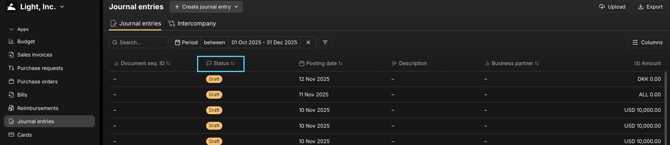
Draft Journals
Journals can be saved as Draft.
Draft = not yet in the ledger.
Finance can park work-in-progress here — then return later to complete / post.
Posting a Journal
Click Post journal when ready.
Behaviour depends on whether Journal Approvals are configured:
Once posted → the journal enters the ledger and appears in all reporting (Transactions, Pivot, Tables etc).
Reversal / Cancellation
Light supports full reversals.
| | Action What happens | | --- | --- | | Reverse a posted journal | Light auto-creates an opposite journal (same coding, opposite signs) — typically into the next period | | Cancel an unposted journal | Draft is deleted — nothing posts to ledger |
Reversals create a clean audit trail — no overwriting.
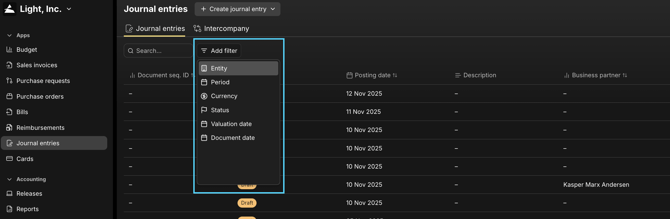
Searching Journals
Journals → Search
Filter by:
-
Entity
-
Account
-
Status (Draft / Approving / Posted / Reversed)
-
Date range
-
Attachment
Source Tracking
Every journal has a Source field — so you always know whether it was system-generated or manually created.
Examples:
- Manual
- Bank posting
- Cards
- Prepayment release
- Revenue recognition
- Imports (historical upload)
This supports clear audit trails.
Where Journals Appear in Reporting
All posted journals appear in:
- Transactions (line-level ledger listing)
- Pivot Tables
- Table Reports (P&L, Balance Sheet etc)
Journals are just another ledger posting — fully consistent with Bills, Invoices, Bank, Cards etc.