This covers both:
- employee view (submitting spend)
- finance admin view (reviewing, coding, posting, paying)
Employee Experience — Submitting Expenses
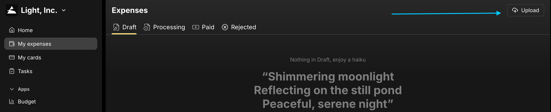
Employees submit expenses in:
Home → Expenses
They can:
-
upload a receipt (drag & drop in Light or mobile upload via Slack or the Light Mobile App)
-
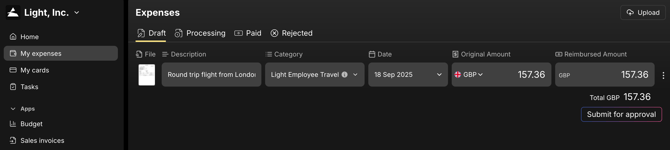
enter Description / business purpose
-
select category
-
submit for approval
Once submitted → the item enters the approval flow (status: Approving / Processing)
Reimbursements (Out-of-Pocket)
A Reimbursement = employee paid personally (cash / personal card) and needs to be repaid.
Process flow:
-
Employee submits expense
-
Light automatically generates an expense report with a receipt per line
-
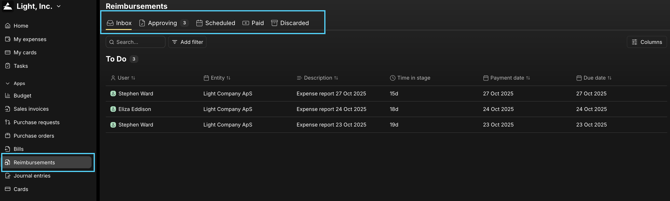
Finance sees the expense report and can send for approval (similar flow to AP Bills)
-
Approvers review & approve/reject
-
Upon approval, a payment run approval needs to be done
-
Reimbursement is paid (automatic or manual)
Finance Admin View (Control & Oversight)
Finance can:
- correct or finalise coding (GL, VAT, custom properties, entity)
- split lines
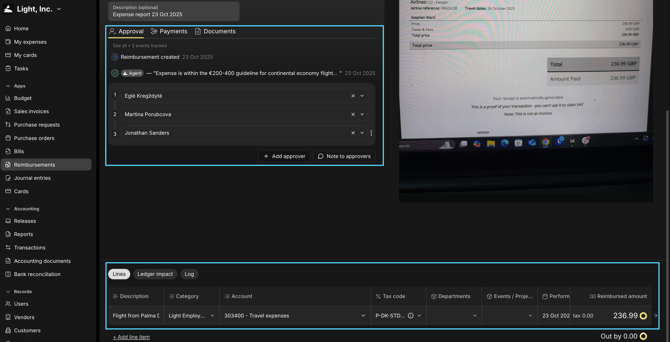
Approvals
Approvers receive tasks:
- in Light’s Webapp
- in Slack or Teams (if connected)
- In Light’s Mobile App
They can Approve / Reject / Comment.
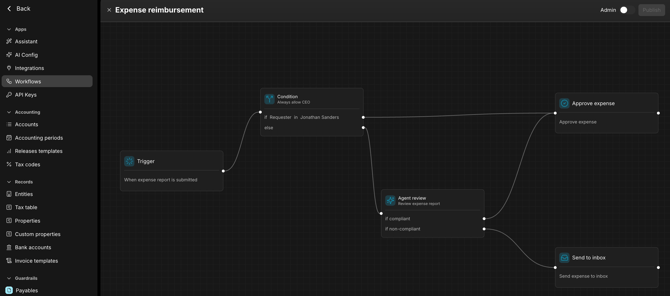
Approval logic is determined by your workflow rules
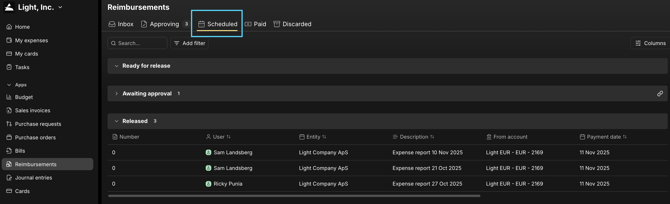
Paying Reimbursements
If bank payments are enabled:
- reimbursements move into Scheduled and are paid automatically
If bank payments are not enabled:
-
finance manually marks reimbursement as Paid
Workflow Logic — Where Approvals Are Configured
All AP/Expense approvals live in:
Settings → Workflows
Rules can be based on:
- amount
- expense type (card vs reimbursement)
- vendor
- department / cost centre / custom fields
- entity
Example:
“All card transactions over €2,000 must go to Finance Director”