
Overview
Custom Properties in Light are dimensions — just like Departments, Cost Centres or Projects in systems such as NetSuite, Workday or SAP.
They let you tag transactions with flexible attributes without creating hundreds of GL accounts.
In short:
Keep your Chart of Accounts clean. Use dimensions for detail.
Why Custom Properties Matter
Without dimensions, companies often create dozens of extra GL codes for cost tracking — making reporting messy and maintenance-heavy.
With Custom Properties, you can:
- Keep the GL structure lean
- Slice reporting data by any segment
- Build multi-dimensional P&Ls and variance reports
Common segmentation models:
| | Use case Example values | | --- | --- | | Department | Finance / Marketing / Engineering / Sales | | Cost Centre | HQ / Field Ops / Logistics | | Project / Campaign | SaaS Launch / Rebrand Q2 / NYC Office Fitout | | Market / Region | EU / US / APAC / LATAM | | Customer Segment | SMB / Mid-Market / Enterprise | | Brand / Product Line | Alpha / Beta / Gamma |
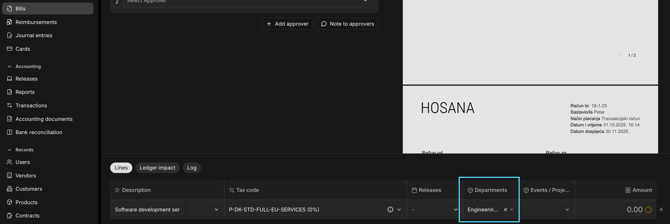
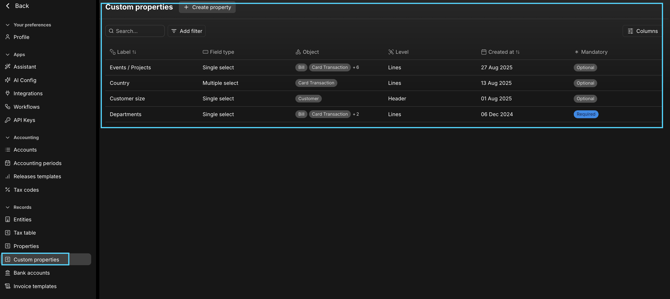
Where to Create Custom Properties
Navigate to
Settings → Custom Properties
Click + Create Property
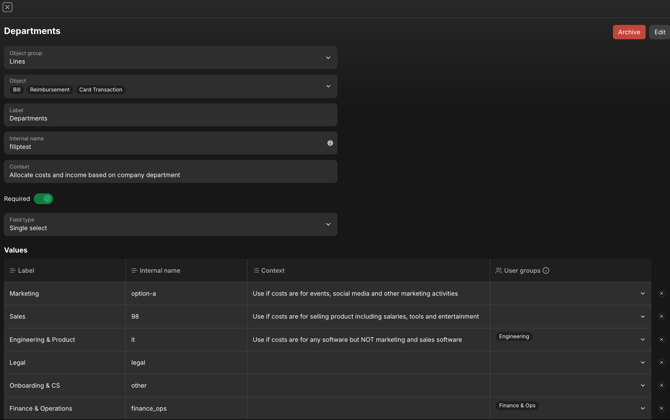
You’ll define:
-
Object Group
- Lines — appears on individual coding lines (Bills, Journals, Cards, etc.)
- Header — applies at the document level (Customer, Contract, etc.)
-
Object(s)
Select where the property applies (you can select multiple):
- Bill
- Journal Entry
- Purchase Order
- Card Transaction
- Credit Note
- Reimbursement
-
Label — the user-facing name (e.g. Department)
-
Internal Name — permanent system name (cannot be changed once created)
-
Context — optional short description or use note
-
Field Type — choose one:
- Single Select → pick one option (e.g. one Department per line)
- Multiple Select → tag multiple values (e.g. shared projects)
- Date → for date tagging
- Text → for open input fields
-
Required toggle — option to make property mandatory before submission
Adding Values
After creation, click into the property to add permitted values.
Example:
| | Property Values | | --- | --- | | Department | Finance / Sales / Marketing / Ops / R&D | | Project | SaaS Launch / GTM’25 / NYC Office Fitout | | Region | EU / US / APAC / LATAM | | Customer Segment | SMB / Enterprise |
You can:
- Rename values anytime
- Archive values to prevent future use (historical data remains intact)
Where Custom Properties Appear
Custom Properties appear anywhere coding happens:
- Bill (line level)
- Invoice (Sales invoice) — line level
- Reimbursement — line level
- Journal Entry — line level
- Purchase Order — line level
- Credit Note — line level
- Customer Credit — line level
- Card Transaction — line level
- Contract — line level
They’re visible in both:
-
Line-level coding panels (for Finance)
-
Submission forms (for Employees, if enabled)
Both employees and finance teams can assign values — permissions determine who can edit them.
Reporting by Custom Properties
This is where dimensions show their value.
Custom Properties are fully integrated into reporting — they become filters, rows, and columns in Light’s analytics.
Use them in:
-
Income Statement
-
Pivot Tables
-
Transaction Reports
Examples:
- Spend by Department (monthly)
- Revenue by Region (quarterly)
- Project P&L (by initiative)
You can combine multiple dimensions — e.g.
Department = Marketing + Project = GTM’25 → for granular cost analysis.
Budgets by Dimension
Budgets can be uploaded per dimension combination, allowing highly specific tracking.
Example:
Department = Marketing
Project = SaaS Launch
Budget = €25,000 for Q1
Then, in reporting → compare Actual vs. Budget by those same dimensions.
Modelling Best Practices
- Keep the Chart of Accounts high-level and consistent
- Use Custom Properties for segmentation
- Archive unused values rather than delete them
- Clearly define each property’s ownership (who maintains the list)
Audit & Traceability
Every Custom Property value is stored on each journal line, ensuring a complete audit trail.
You can always see which dimensions were tagged — and by whom — directly in the Transactions or Reports modules.
Summary
Custom Properties are the backbone of dimensional accounting in Light.
They give you:
- Structured, flexible segmentation
- Rich reporting without GL clutter
- Workflow automation and intelligent coding suggestions
- Full audit visibility
Once configured, they transform how finance teams track performance, automate approvals, and understand spend.