
Overview
Bank Reconciliation in Light is where actual bank movements are matched to ledger activity.
- Left panel = what the bank actually did
- Right panel (Open) = invoices to reconcile against
- Right panel (Closed) = journals posted to the bank account to reconcile against
Your goal = link each bank line to its accounting source
→ until 0 unallocated remain.
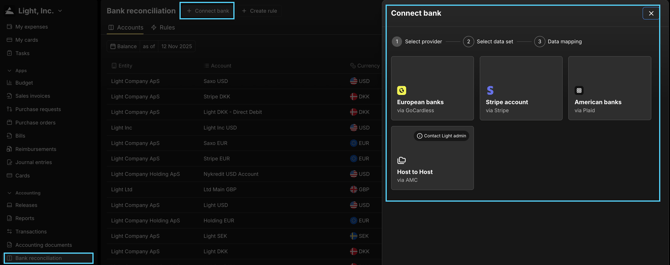
Connecting Bank Accounts
Go to:
Settings → Integrations → Bank Accounts
Supported connection types:
| | Method Description | | --- | --- | | Direct bank through "GoCardless" or "Plaid" | Connect your actual bank account → Light streams transactions automatically |
Note: a bank connection is not the same as the Chart of Accounts.
Each bank account must exist as an entity bank account in Settings.
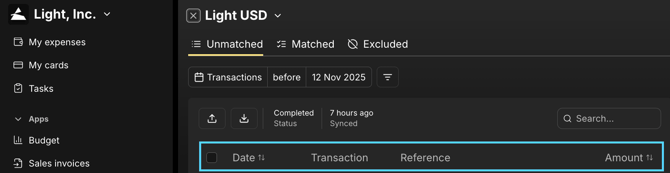
Where bank feeds land
Accounting → Bank Reconciliation
Each line includes:
-
date
-
reference
-
amount
How matching works
Select a bank line on the left → Light surfaces candidate matches on the right:
| | Section Meaning | | --- | --- | | Open Transactions | unpaid items (Bills, Reimbursements, Cards, AR receipts) | | Closed Transactions | posted journals / allocations already in GL coded to this bank account |
Click Match to complete the link.
Auto-matching (AI)
Light learns from repetition:
- references
- counterparty names
- typical amount patterns
If Light believes it knows the match → a match suggestion is surfaced.
You can accept or override at any time.
Reconciliation status
The header shows real-time progress:
- auto-matched count
- to allocate count
- posted from bank count
Target state = 0 to allocate
Only when this is zero → your bank balance in Light ties to the bank’s real-world balance.
Balances
Once banks are connected you can view:
- actual bank balance
- cleared GL balance
- difference (unreconciled)
This aligns once reconciliation = complete.
Key behavior notes
- reconciliation is per bank account per entity
- missing periods can be filled via file upload
- reconnect / refresh can be done any time
- matching creates the audit chain between bank reality + accounting ledger