
AP Automation in Light
Light applies automation inside the Bill approval flow.
This automation includes:
- Bills routed to the correct approver(s)
- Approvals based on amount, vendor, entity, department, etc.
- Ability to connect Bills to Purchase Orders for visibility
AP Approval Logic (Workflows)
Approval conditions are configured in:
Settings → Workflows
Examples of common rules:
| | Scenario Example Rule | | --- | --- | | value based | “Bills over €5,000 must be approved by CFO” | | vendor based | “All AWS Bills route to CTO first” | | department / custom property based | “Marketing invoices → Marketing Lead then Finance” |
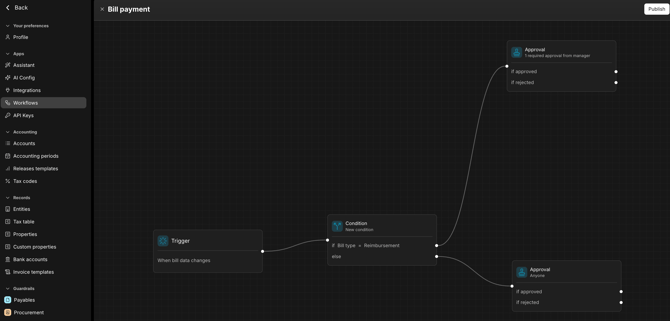
Approvals can be completed:
- In Light’s Web app
- In Light’s Mobile app (recommended)
- in Slack or Teams (if connected)
When the final approver approves → the Bill automatically moves to Scheduled for payment run approval.
AP Automation Flow Summary
-
(Optional) PO created
-
Bill arrives → Inbox
-
Finance codes Bill & selects PO if relevant
-
Workflow rules auto-determine approvers
-
Approvers approve/reject
-
On final approval → Bill becomes Scheduled for payment run
-
Payment processed (automatic or manual depending on bank setup)